
If you’re using Ryujinx, your saved game data is stored locally on your PC. Knowing where these save files are located is important if you want to back up your progress, transfer saves to another device, or restore lost data.
This guide explains exactly where Ryujinx save files are stored and how to safely move them without losing your progress.
Get: Ryujinx Keys v22.0.0 and Firmware Download
Where Are Ryujinx Save Files Stored?
In Ryujinx, save data is stored inside a system folder on your computer. The easiest way to access it is directly through the emulator.
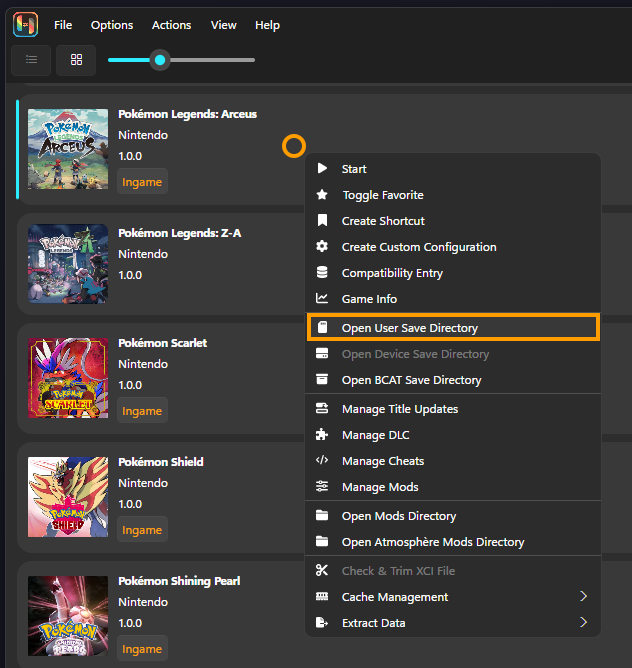
Quick Method (Recommended)
- Open Ryujinx
- Right-click on your game
- Select “Open User Save Directory”
This will instantly open the folder containing your save files for that specific game.
Manual Save Location (Windows)
If you prefer to navigate manually, use this path:
C:\Users\USERNAME\AppData\Roaming\Ryujinx\bis\user\save\
Inside this folder, you’ll find multiple subfolders that store save data for different games.
Quick Tip:
Press Windows + R, type %appdata%, and press Enter to quickly open the Roaming folder.
How to Back Up Ryujinx Save Files
Backing up your saves ensures you never lose progress due to crashes, updates, or system issues.
To back up your data:
- Open the save folder using the steps above
- Copy the entire save folder
- Paste it into a safe location (external drive, cloud storage, or another folder)
This simple step protects all your game progress.
How to Transfer Ryujinx Saves to Another PC
You can easily move your saves from one computer to another and continue playing from where you left off.
Method 1: Transfer Individual Game Saves
- Right-click the game in Ryujinx
- Click “Open User Save Directory”
- Copy the folder
- Paste it into the same location on the new PC
Method 2: Transfer All Saves at Once
- Go to this directory:
C:\Users\USERNAME\AppData\Roaming\Ryujinx
- Copy the entire Ryujinx folder
- Paste it into the same path on your new computer
Make sure Ryujinx is installed on the new system before pasting.
Get: Ryujinx Firmware Download
Important Tips Before Moving Saves
- Avoid overwriting newer saves with older ones
- Always keep a backup copy before replacing files
- Make sure both systems use compatible game versions
- Close the emulator before copying or pasting files
These steps help prevent data loss or corrupted saves.
Can You Use Ryujinx Saves on Other Emulators?
In many cases, save files from Ryujinx can work with other Switch emulators like Yuzu or Suyu Emulator.
However, compatibility may vary depending on:
- Game version
- Emulator version
- File structure differences
Always test with a backup copy first.
FAQs – Ryujinx Save File Location
Where are save files stored in Ryujinx?
Save files are stored inside the Ryujinx data folder on your system, usually under:AppData > Roaming > Ryujinx > bis > user > save on Windows.
What is the easiest way to find Ryujinx save files?
The fastest method is:
Open Ryujinx
Right-click your game
Click “Open User Save Directory”
This directly opens the correct save folder.
Can I transfer Ryujinx save files to another PC?
Yes, you can copy your save folder and paste it into the same directory on another computer. Just make sure the emulator is installed and uses the same setup.
Can I back up all Ryujinx saves at once?
Yes, simply copy the entire Ryujinx folder from AppData. This includes all saves, settings, and cache files in one place.
Are Ryujinx save files compatible with other emulators?
In many cases, yes. Save files can work with other Switch emulators like Yuzu or Suyu Emulator, but compatibility may vary depending on the game and version.
Final Thoughts
Finding and managing save files in Ryujinx is simple once you know the correct location. Whether you want to back up your progress, transfer saves, or restore data, following the steps above ensures everything works smoothly.
